-1.png?width=1092&height=792&name=logo%20(1092x792)-1.png)
%20copy(black%20letters).png?width=1092&height=792&name=logo%20(1092x792)%20copy(black%20letters).png)

Cloud workload migration is the process of moving applications, data, and systems from on-site infrastructure into colocation and private cloud environments. For many Canadian firms, that shift is from fully on-site server rooms and legacy facilities to professionally managed colocation data centres, followed by the creation of a secure private cloud environment.
When you plan this migration carefully, you reduce operational risk, improve resilience, and modernize your infrastructure without disrupting business operations.
This article explains how to transition from on-site infrastructure to a colocation facility, how to design a private cloud environment, and what factors influence long-term infrastructure strategy. You will also find practical planning steps and a checklist to guide your IT team whether you do it yourself or work with a service provider who does both on your behalf.
Throughout, you will see how moving out of on-site facilities supports scalability, compliance, and business continuity while aligning with long-term growth objectives.
Why Move from On-Site Facilities to Colocation?
Many Canadian organizations still operate infrastructure in on-site server rooms. While this model provides direct control, it often comes with significant challenges, including upkeep of aging power and cooling systems, limited redundancy, physical security constraints, difficulty scaling capacity, and high capital cost of upgrades.
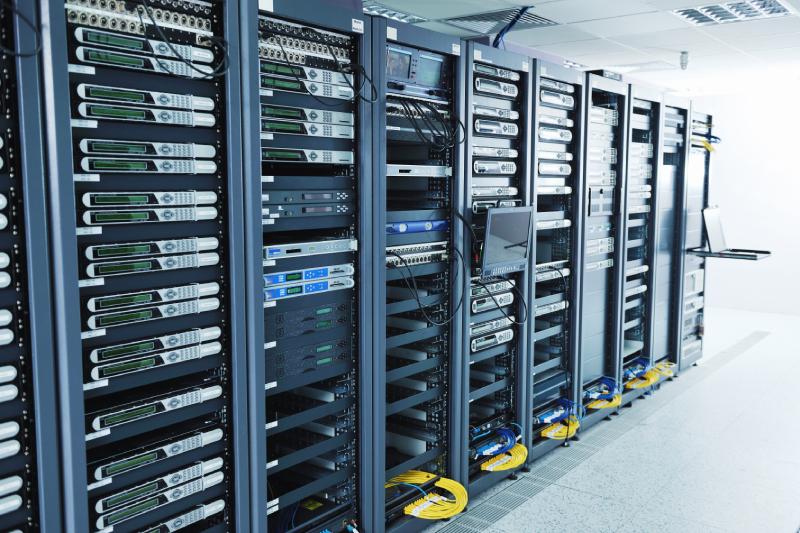
Colocation facilities address many of these issues by delivering enterprise-grade power, cooling, connectivity, and physical security within a professionally managed data centre environment. Rather than maintaining building infrastructure themselves, organizations can place their servers and networking equipment in a secure colocation facility while retaining full ownership and control of their hardware. For many firms, colocation ultimately becomes the foundation for building a private cloud environment.
Building a Strong Foundation with Colocation and Private Cloud
Moving to colocation is often the first structured step away from on-site dependency. Once systems are housed in a resilient data centre, organizations can modernize architecture and introduce private cloud capabilities.
A private cloud environment in colocation means you don’t have to worry about site concerns like security, power, cooling, and usually internet resilience. You can focus on:
- Virtualized compute, storage, and networking
- Segmented and secure environments
- Predictable performance and costs
- In most cases, dedicated infrastructure
This approach delivers cloud-like flexibility while maintaining full control over data location, compliance posture, and infrastructure design. Some colocation providers also offer private cloud with logic security and client segmentation, which becomes an option.
For Canadian firms with data sovereignty requirements, Canadian cloud colocation combined with private cloud architecture keeps systems within controlled geographic borders and aligned with regulatory obligations.
Workload Assessment: Reviewing On-Site Systems Before Migration
Before leaving an on-site facility, you must understand what is running in your environment today.
This assessment includes:
- Inventory of all systems running today
- Resource usage for each workload, such as CPU, memory, and storage
- Network dependencies and communication paths
- Peak performance demands
- Security and compliance needs
- Projected growth needs
You also need to evaluate physical infrastructure risks. For example, does your equipment have dual power supplies? To take advantage of the resilient power in a data centre, you’ll want to connect to two power feeds. Are they rack mountable and do you have rails? These aren’t show stoppers but mean you should consider rack mounts, Automated Transfer Switches, and shelves as part of your deployment.
Make sure the power available at your selected data centre meets your minimum standards since they aren’t all the same. For example, are there two feeds from separate power distribution panels, diverse Uninterruptible Power Systems, and one or more standby power generators in case of an extended power grid failure?
You should also have a basic understanding of the fire and cooling requirements you want in place. Dual or single-stage fire suppression, redundant tons of cooling, and if you aren’t sure, your business insurance might have some standard requirements to make sure your selected colocation partner meets your needs
Understanding these factors helps you determine which equipment should be moved to colocation, which assets should be added or replaced during the migration process, which systems can be virtualized into a private cloud infrastructure, and which components can be fully decommissioned.
A structured assessment reduces downtime and prevents costly surprises during relocation.
Capacity and Performance Planning in a Colocation Model
Capacity planning changes significantly when moving from an on-site environment to a colocation facility. In your own building, expansion may require construction, electrical upgrades, or a redesign of cooling systems. In a colocation environment, however, scaling is typically far simpler and may involve adding racks, increasing power circuits, or provisioning additional cross-connects.
When designing a private cloud within a colocation facility, it is important to evaluate baseline compute requirements, storage performance, including IOPS and redundancy, network throughput, inter-site connectivity, and projected future growth.
Designing Your Private Cloud Environment

Once infrastructure is housed in colocation, the next step is building a resilient private cloud architecture.
Private cloud in colocation typically includes:
- Hypervisor-based virtualization platforms
- Tiered storage solutions
- Centralized monitoring
- Automated backup and replication
- Disaster recovery integration
This design provides many of the benefits associated with public cloud - flexibility, scalability, and automation - while keeping infrastructure dedicated and predictable.
Organizations often choose private cloud in colocation because it eliminates “noisy neighbour” concerns and provides consistent performance for mission-critical workloads.
Key Factors That Influence On-Site Infrastructure Migration to Colocation
Several factors typically drive the move away from on-site facilities:
1. Infrastructure Risk
Single power feeds, limited cooling redundancy, or outdated fire suppression systems increase operational risk.
2. Business Continuity
Canadian redundant power colocation facilities offer generator backup and advanced physical security, reducing the risk of single points of failure.
3. Scalability
Growing businesses often outpace the physical limits of on-site server rooms.
4. Compliance and Data Sovereignty
Canadian firms often require clear geographic control over data location.
5. Capital vs. Operational Spending
Colocation shifts spending from large capital upgrades toward predictable operational costs.
Each organization must weigh these factors based on its growth plans, compliance requirements, and risk tolerance.
Reviewing Business Needs and Long-Term Strategy
Infrastructure migration should align with business outcomes.
Ask:
- Are we planning geographic expansion?
- Do we need higher availability guarantees?
- Are compliance obligations increasing?
- Do we need more predictable IT costs?
A move to colocation and private cloud is often part of a broader modernization strategy. It creates a stable core infrastructure layer that can later integrate with public cloud services if needed.
Planning with long-term goals in mind prevents repeated infrastructure overhauls.
How Colocation and Private Cloud Support Future Growth
Colocation combined with private cloud supports future workloads by:
- Providing scalable rack and power capacity
- Faster provisioning to one or more locations
- Improving disaster recovery capabilities
- Enhancing physical and network security
- Reducing dependency on building-level infrastructure
Operational teams spend less time managing facility constraints and more time improving applications and services.
Built-in replication between colocation sites can significantly strengthen business continuity strategies compared to most on-site server rooms.
Conducting Internal Reviews After Migration
An internal review process helps you refine your private cloud adoption steps. Teams come together to review performance, costs, and risks. You learn what worked and what did not.
Part of this review includes security requirements. You verify that access controls, encryption, and logging meet your standards. You also update your policies based on new features and threats.
These reviews ensure your new environment continues to align with business objectives and compliance requirements.
A Practical Checklist for Moving from On-Site to Colocation and Private Cloud
A structured checklist keeps migration organized and reduces risk.
Pre-Migration
- Define business objectives
- Complete infrastructure inventory
- Audit power, cooling, and hardware lifecycle
- Assess workload dependencies
- Select colocation facility
- Design private cloud architecture
- Plan connectivity and failover
Migration Phase
- Stage new hardware if required
- Schedule phased equipment relocation
- Validate rack layouts and power feeds
- Test connectivity and replication
- Implement backup and monitoring
Post-Migration
- Validate workload performance
- Conduct failover tests
- Optimize virtual resource allocation
- Decommission legacy on-site systems
- Review cost and capacity models
Following a phased and structured approach ensures minimal disruption. If your colocation provider also provides private cloud services, as Whipcord Edge does, a few of these steps can be avoided.
Understanding What a Workload Means in a Private Cloud Context
A workload is any application, system, or service that consumes compute, storage, and network resources.
In a private cloud environment within colocation, workloads run on shared virtual infrastructure pools while maintaining logical separation and security controls.
Documenting each workload, including performance requirements and compliance needs, helps assign appropriate resource tiers and protection levels.
Managing Security and Compliance During Migration With Whipcord
Secure workload migration requires careful evaluation of security throughout any move from on-site facilities to colocation and private cloud.
You must evaluate:
- Physical security controls
- Data encryption standards
- Access management policies
- Logging and monitoring requirements
- Options for Backup and disaster recovery configurations
- Hybrid options for any of your equipment that still has a useful life.
Whipcord Edge supports organizations in planning infrastructure relocation, designing private cloud environments, and aligning systems with Canadian data sovereignty regulatory requirements.
With expertise in colocation, private cloud architecture, and hybrid integration, Whipcord helps firms modernize infrastructure while maintaining security and operational stability.
If you are considering a move from on-site infrastructure to colocation and private cloud, contact Whipcord to review your needs and start building your private cloud adoption plan.
Frequently Asked Questions About Cloud Workload Migration
What is cloud workload migration?
Cloud workload migration is the process of moving applications, data, and computing workloads from on-site infrastructure into colocation and private cloud environments. It typically involves assessing existing workloads, selecting a colocation partner, designing a private cloud architecture, then migrating in phases to limit downtime. For Canadian firms, this usually includes evaluating data sovereignty requirements and redundant power availability before any hardware moves. The process also accounts for network dependencies and application performance, since a poorly planned migration can disrupt daily operations. Done correctly, cloud workload migration creates a more scalable and resilient infrastructure foundation for future growth.
What is data sovereignty and why does it matter for cloud workload migration in Canada?
Data sovereignty means data is subject to the laws of the country where it's stored, which shapes how Canadian firms plan cloud workload migration. Many organizations, especially in finance and healthcare, must keep data within Canadian borders. Choosing a Canadian-based colocation and private cloud provider keeps systems within controlled geographic boundaries and simplifies compliance audits. Firms should also confirm where backups and disaster recovery copies are stored, since these are often overlooked during data sovereignty planning. Addressing data sovereignty early prevents costly redesigns later in the migration process.
How does secure workload migration protect Canadian business data during a move to colocation?
Secure workload migration applies access controls, encryption, and monitoring throughout every phase of a move to colocation and private cloud. Reputable colocation facilities also provide restricted physical access and environmental monitoring most on-site server rooms can't match. Testing failover and backup systems before decommissioning legacy infrastructure ensures no protection gap during the transition. Logging and audit trails maintained throughout the process also help demonstrate compliance with Canadian data sovereignty regulations if questions arise. Firms working with an experienced provider typically see fewer security incidents than those managing the move in-house.
What is included in a workload assessment before migrating to colocation and private cloud?
A workload assessment reviews existing systems before any move to colocation and private cloud begins, including an inventory of applications, resource usage, network dependencies, and compliance needs tied to data sovereignty. It also evaluates power redundancy and rack compatibility. Skipping this step is a common cause of downtime and budget overruns during on-site infrastructure migration. Results from the assessment help determine which systems should move as-is and which should be virtualized into a private cloud architecture. A thorough workload assessment ultimately reduces risk and keeps the migration timeline realistic.
What is private cloud architecture and how does it differ from public cloud?
Private cloud architecture runs on dedicated infrastructure within a colocation facility, rather than the shared, multi-tenant resources used in public cloud. This gives Canadian firms predictable performance and greater control over data location, supporting data sovereignty requirements. It typically includes virtualization, tiered storage, and automated backup and replication. Because infrastructure isn't shared, private cloud architecture also avoids the performance inconsistencies that can occur in multi-tenant public cloud environments. Many organizations see it as a practical middle ground between traditional on-site infrastructure and full public cloud adoption.
How does Canadian cloud colocation support data sovereignty requirements?
Canadian cloud colocation keeps servers and private cloud infrastructure physically located within Canadian borders and subject to Canadian law, important for regulated sectors where data can't leave the country, even for backups. Firms retain full ownership of their hardware while the facility handles power, cooling, and physical security, simplifying compliance reporting. This arrangement also makes it easier for audit teams to confirm data residency without tracing infrastructure across multiple countries or cloud regions. Combining Canadian cloud colocation with a private cloud architecture gives firms the flexibility of cloud computing without giving up geographic control.
Why is Canadian redundant power colocation important for business continuity?
Canadian redundant power colocation reduces downtime risk through multiple independent power feeds, backup generators, and uninterruptible power systems that most on-site server rooms can't cost-effectively replicate. A single power feed is one of the most common causes of unplanned outages, so this level of resilience directly supports business continuity planning. Facilities offering true redundancy typically test failover procedures regularly rather than relying on backup systems that have never been proven under load. When evaluating a provider, firms should confirm generator run-time and power feed diversity rather than assuming redundancy exists by default.
What are the first steps in on-site infrastructure migration to colocation?
On-site infrastructure migration typically starts with a workload assessment, followed by selecting a colocation facility that meets power, cooling, and data sovereignty requirements. Early steps include an infrastructure inventory, hardware lifecycle audit, and defining clear business objectives for the move before staging hardware or scheduling relocation. Firms should also plan connectivity and failover, since addressing these details during the move itself is a common cause of unplanned downtime. A phased approach, rather than a single cutover, generally produces a smoother transition to colocation and private cloud.
Key Takeaways on Moving from On-Site Infrastructure to Colocation and Private Cloud
A successful move to colocation and private cloud starts with a thorough workload assessment and a colocation facility that meets your power, cooling, and data sovereignty needs. Canadian firms should treat redundant power and compliance as core decisions, not afterthoughts.

.png?width=100&height=91&name=white%20logo%20(100x91).png "white logo (100x91)")