-1.png?width=1092&height=792&name=logo%20(1092x792)-1.png)
%20copy(black%20letters).png?width=1092&height=792&name=logo%20(1092x792)%20copy(black%20letters).png)
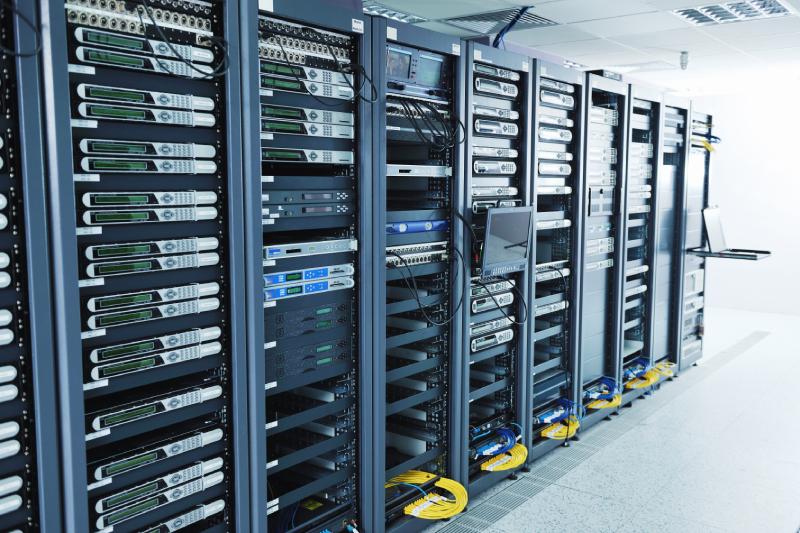
Growing companies reach a point where basic server rooms stop working. Power limits show up. Cooling becomes unreliable. Downtime starts to cost real money. At that stage, many teams begin looking at the benefits of colocation as a way to keep systems stable while the business grows.
The benefits of colocation matter most when growth creates pressure. More users mean more traffic. More data brings stricter data governance requirements. More applications demand higher uptime. Colocation gives you a way to meet those needs without rebuilding your entire IT environment from scratch.
This article explains how colocation works, breaks down the on-site servers vs colocation debate, and how the right colocation services support long-term growth. It also covers how to assess colocation facilities, how to compare colocation vs cloud hosting, and how Whipcord supports teams through colocation project management from start to finish.
What Is Colocation?: Understanding the Basics
Before choosing any infrastructure model, you need clarity on what colocation is and what it is not.
Colocation is a model where you own your servers and place them in a third-party data centre. The provider supplies power, cooling, physical security, and network connectivity. You manage the hardware and software. The facility keeps the environment stable and available.
When people ask what a colocation data centre is, the answer is simple. It is a purpose-built facility designed to house customer-owned equipment under controlled conditions. These sites are built to handle far more power density, redundancy, and physical security than an office server room.
Understanding how colocation works helps avoid confusion later. You install your equipment in racks or cages. The provider connects you to power and network carriers. You access your systems remotely or on-site as needed. The provider maintains the building, generators, cooling systems, and access controls.
Why Firms Continue to Shift From On-Site Servers
Many firms start with on-site servers because it feels simple. Over time, that simplicity disappears. What worked for a small team stops working once systems grow, data volumes increase, and uptime expectations rise.
Power is often the first limit teams hit. Office buildings rarely support the electrical load modern servers require. Adding new hardware means risking overloaded circuits or expensive electrical upgrades. Both create delays and risk.
Cooling becomes the next issue. Office HVAC systems are built for people, not dense racks running all day. As equipment heats up, systems throttle performance or shut down. Even short temperature spikes can shorten hardware lifespan and increase failure rates.
Downtime also becomes more visible. A brief power outage that once caused minor disruption now stops revenue, customer access, or internal operations. Backup power in offices often means small UPS units that last minutes, not hours.
Physical security creates another challenge. Server rooms inside offices are easier to access than most teams realize. Cleaning crews, contractors, and staff turnover increase exposure. One lost key or shared access code can become a serious issue.
Insurance and compliance costs rise as well. As data volumes grow, insurers look more closely at risk controls. Premiums increase when power redundancy, fire suppression, and access controls fall short. Auditors also expect clearer documentation and tighter controls.
These pressures push firms to look beyond on-site setups. Colocation providers offer environments built for infrastructure, not office convenience. Power, cooling, and security come standard, not as add-ons.
Compliance plays a major role for Canadian organizations. Many firms must meet strict data governance requirements around data location, access logging, and retention. Certified colocation facilities support these needs with audited controls and documented processes. That makes audits faster and reduces internal workload.
The shift is rarely about chasing trends. It is about removing limits that slow growth and increase risk, which is why the on-site servers vs colocation comparison keeps coming up in IT planning conversations.
Key Factors Shaping Current Adoption Trends
Several trends influence the colocation industry today, and these trends help explain why many organisations shift away from on-site servers. These forces affect how IT teams plan, buy, and operate infrastructure.
One of the biggest drivers is data growth. The amount of digital data produced each year continues to rise. Global market research shows the colocation market alone is expected to expand significantly between 2025 and 2030 as demand rises, with projections from some analysts showing the industry could more than double in size by 2035.
This growth ties directly to rising demand for storage and processing. Reports show global data centre capacity is increasing as companies add new systems to handle web traffic, analytics, AI workloads, and Internet of Things (IoT) devices. These trends create pressure on internal infrastructure, pushing firms to seek out specialised colocation facilities that can keep up with scale.
Availability expectations are also shaping adoption. In 2025, data centre vacancy rates in North America hit historic lows, often below 3 per cent, and this is especially true for colocation providers Canadian businesses depend on, where available rack space is increasingly scarce in markets like Toronto and Vancouver. That means existing space fills quickly, and companies need facilities that have strong power redundancy, cooling, and network options. Users expect their systems to be up every hour of every day. Customers, partners, and internal teams have little tolerance for outages. High availability environments offered by colocation providers support those expectations better than makeshift server rooms.
Regulatory pressure adds another layer. Governments and sectors impose strict rules on where and how data is stored and protected. For many Canadian organisations, meeting data governance requirements is not optional. Colocation facilities often have certifications and documented controls that simplify audits and help firms demonstrate compliance.
Network choice also affects adoption. Carrier-neutral colocation gives businesses the ability to connect to multiple carriers, internet exchanges, or cloud providers without vendor lock-in. That flexibility helps teams optimise performance and negotiate better pricing for bandwidth.
Finally, cost predictability matters. Many firms find that colocation pricing is simpler to forecast than public cloud bills, which can vary widely with usage. Knowing monthly colocation costs helps keep IT budgets stable and prevents surprises. These factors together create an environment where colocation adoption continues to grow, and why firms include colocation in long-term IT strategy planning.
How Colocation Benefits Support Long-Term Growth
The colocation benefits that matter most are not flashy. They are practical.
Colocation supports growth by:
- Providing stable power and cooling as equipment expands
- Reducing unplanned downtime
- Supporting compliance with data protection services and audit needs
- Allowing gradual infrastructure changes instead of forced migrations
One of the key benefits of colocation is control. You decide when to refresh hardware. You choose security tools. You control network design. That control helps when business needs change faster than vendor roadmaps.
Colocation also improves risk management. Facilities include backup generators, redundant power feeds, and controlled access. These features reduce exposure to local outages and physical threats.
For many firms, colocation benefits include better performance. Latency improves when systems sit closer to users or partners. That matters for manufacturing systems, financial applications, and real-time services.
Ready to see how colocation could work for your infrastructure? Get a Colocation Readiness Check.
Assessing Colocation Facilities for Business Needs
Not all colocation facilities meet the same standards. Choosing based on price alone often leads to problems later.
You should assess each site against your current and future needs.
Key questions include:
- How much power density can the facility support
- What redundancy levels exist for power and cooling
- How physical access is controlled and logged
- What certifications the site holds
- How maintenance and incident response work
Colocation vs data center comparisons often confuse buyers. A colocation site is a type of data center. The difference lies in ownership and management. In colocation, you own the equipment. In other data center models, you may not.
Power and Cooling Standards That Matter
Power and cooling define uptime.
Look for facilities that offer:
- Redundant utility feeds
- Backup generators with tested fuel supply
- UPS systems that support clean power delivery
- Cooling designed for high-density racks
Cooling failures cause more outages than many teams expect. Modern colocation facilities design airflow and redundancy to avoid hotspots and shutdowns.
Ask for documented uptime history. Reliable colocation providers will share real numbers and maintenance schedules.
Choosing a Reliable Colocation Provider for Continuity
Your colocation provider becomes part of your operations team. Reliability matters more than branding.
A strong provider offers:
- Clear service level agreements
- Transparent incident communication
- On-site support for remote hands tasks
- Stable network options
Top colocation providers Canadian businesses rely on focus on consistency. They do not oversell capacity. They plan upgrades before demand spikes.
You should also consider location. Proximity affects latency, travel time, and compliance. Canadian businesses often prefer providers that keep data within national borders.
When comparing colocation providers, ask how they support growth. Some providers limit expansion or require disruptive moves. Others plan rack space and power with long-term customers in mind.
Comparing Colocation vs Cloud Hosting for IT Strategy
The debate around colocation vs cloud hosting often misses context. Both models serve different needs.
Cloud hosting offers speed and flexibility. It suits variable workloads and rapid testing. Colocation offers predictability and control. It suits steady workloads, compliance-driven systems, and performance-sensitive applications.
Colocation vs cloud hosting decisions should focus on workload characteristics, not trends.
Use colocation when:
- Workloads run constantly
- Data residency matters
- Performance must stay consistent
- Long-term costs need stability
Use cloud hosting when:
- Demand spikes unpredictably
- Projects are short-lived
- Teams need fast deployment
When a Hybrid Mix Creates More Stability
Many firms use both models. A hybrid setup combines cloud resources with colocated infrastructure.
This approach:
- Keeps core systems stable in colocation
- Uses cloud for burst capacity
- Reduces vendor lock-in
- Improves disaster recovery design
Hybrid strategies work best when planned carefully. Network design, security policies, and monitoring must align across environments.
Carrier-neutral colocation supports hybrid models by allowing direct connections to multiple cloud platforms.
Planning With Colocation Project Management Steps
Moving into colocation requires planning. Poor execution causes outages and delays.
Colocation project management typically includes:
- Hardware assessment and sizing
- Facility selection and contracting
- Network design and carrier selection
- Migration planning and testing
- Cutover scheduling
- Post-move validation
Clear timelines reduce risk. Every system should have rollback plans. Testing should happen before live cutover.
Good colocation project management also involves documentation. Power requirements, rack layouts, and access procedures must stay current.
Aligning Internal and External Teams With Whipcord
Successful projects align people, not just systems.
Whipcord works with your internal IT team, vendors, and carriers to keep projects on track. Roles stay clear. Communication stays direct. Decisions happen early, not during outages.
Whipcord supports planning, migration, and ongoing operations. The focus stays on keeping your systems available while your business grows.
If you are evaluating colocation services, talking to Whipcord early helps avoid mistakes that cost time and budget later.
Growth stresses infrastructure in predictable ways. Power limits appear. Cooling struggles. Downtime costs increase. Compliance pressure rises. The benefits of colocation address these issues with practical solutions.
By choosing the right colocation facilities, working with reliable colocation providers, and planning carefully, growing companies gain stability without giving up control.
Frequently Asked Questions About the Benefits of Colocation
What is colocation and how does it work?
Colocation is a service where a business owns its servers and places them inside a third-party data centre that provides power, cooling, physical security, and network connectivity. The business manages its own hardware and software, while the facility keeps the environment stable and available at all times. In practice, teams install servers in dedicated racks or cages, connect to power and network carriers supplied by the facility, and access systems remotely or on-site when maintenance is needed. Colocation facilities are built to handle far higher power density and redundancy than a typical office server room, which is why so many growing companies move critical systems into these environments. For a closer look at how this compares to running your own infrastructure, see our section on colocation vs cloud hosting above.
What are the main benefits of colocation for growing businesses?
The main benefits of colocation include stable power and cooling, reduced unplanned downtime, stronger physical security, and easier compliance with data governance requirements. Growing companies often outgrow office server rooms once power draw increases and cooling systems struggle to keep pace, and colocation removes those limits without forcing a full infrastructure rebuild. Facilities typically include backup generators, redundant power feeds, and controlled access, which lowers exposure to outages and physical threats. Performance can improve too, since systems placed closer to users or partners often see lower latency, which matters for financial applications, manufacturing systems, and other real-time services that cannot tolerate delay. Control over hardware refresh cycles and security tooling is another advantage many teams value as they scale.
How does colocation compare to cloud hosting?
Colocation and cloud hosting solve different problems, so the right choice depends on workload type rather than trends. Colocation offers predictability and control, and suits steady workloads, compliance-driven systems, and applications where consistent performance matters most. Cloud hosting offers speed and flexibility, and suits variable demand, short-lived projects, and situations where teams need to deploy quickly without managing physical hardware. This hybrid approach can reduce vendor lock-in and improve resilience, provided network design and security policies stay aligned across both environments. When weighing colocation vs cloud hosting, the deciding factors are usually workload consistency, data residency needs, and how predictable your long-term infrastructure costs need to be over several years.
What should I look for in colocation providers Canada-wide?
Businesses comparing colocation providers Canada-wide should look closely at power density, redundancy levels, physical security, and certifications before signing a contract. Facilities should offer redundant utility feeds, tested backup generators, and cooling designed for high-density racks, since cooling failures cause more outages than most teams expect. Data location matters as well, and many Canadian organisations must meet strict data governance requirements around where data is stored, how access is logged, and how long records are retained. It also helps to ask providers how they plan for growth, since some limit expansion or require disruptive moves later, while stronger providers plan rack space and power capacity with long-term customers in mind. Vacancy rates across North American data centres have fallen below 3 per cent in recent years, so early planning matters.
What's the real difference between on-site servers vs colocation?
The core difference in the on-site servers vs colocation debate comes down to who manages the physical environment around the equipment. With on-site servers, the business handles its own power, cooling, and security inside office space that was never designed for dense server racks, which creates real limits as systems grow. With colocation, the equipment still belongs to the business, but a purpose-built facility supplies power, cooling, physical security, and network connectivity under controlled conditions. Backup power in offices is often limited to small UPS units lasting minutes rather than hours, while colocation facilities typically run tested generators with documented fuel supply. For most growing companies, colocation removes these physical constraints without requiring a full technology rebuild or unplanned capital expense.
What is carrier neutral colocation and why does it matter?
Carrier neutral colocation means a facility allows connections to multiple network carriers, internet exchanges, and cloud providers rather than locking customers into a single network vendor. This matters because it gives businesses more control over performance, redundancy, and pricing, since they can choose or switch carriers without relocating equipment or renegotiating a facility contract. For compliance-driven organisations, carrier neutrality can simplify network audits, since routing options and redundancy paths are easier to document and verify. Businesses evaluating colocation facilities should ask specifically whether a site is carrier neutral, since this flexibility often becomes more valuable as network needs, bandwidth costs, and cloud usage grow over time. It also reduces the risk of being tied to one carrier's pricing.
What does colocation project management involve?
Colocation project management typically covers hardware assessment and sizing, facility selection and contracting, network design and carrier selection, migration planning and testing, cutover scheduling, and post-move validation. Clear timelines matter because poor execution during a move can cause outages, data loss, or costly delays that affect customers and internal teams alike. Every system being migrated should have a documented rollback plan, and testing should happen well before any live cutover takes place. Aligning internal IT staff, vendors, and carriers early in the process keeps roles clear and reduces the kind of last-minute decisions that tend to happen during outages rather than before them, which is why experienced project oversight is worth the investment.
How do I choose the right colocation facilities for my business?
Choosing the right colocation facilities starts with matching a site's power density, redundancy, and security controls to your current and future needs rather than selecting based on price alone. Ask how much power density the facility can support per rack, what redundancy exists for both power and cooling, and how physical access is controlled and logged throughout the building. It also helps to request documented uptime history, as reliable colocation facilities are typically willing to share real performance numbers and maintenance schedules rather than vague assurances. Finally, consider location and proximity, since this affects latency, travel time for on-site visits, and how well the facility supports Canadian data residency requirements for regulated industries. A short site visit before signing usually reveals more than a glossy brochure ever will.
Start Realising the Benefits of Colocation With Whipcord
If you want to review colocation services that fit your growth plans, contact Whipcord to discuss your requirements and next steps.


.png?width=100&height=91&name=white%20logo%20(100x91).png "white logo (100x91)")